Stay with NOW. See what’s NEXT.
The U.S. stock market day has a rhythm. Keeping the current session and next transition visible helps me stay oriented while my attention is elsewhere.
A stock market clock that keeps the next important moment in view.
I’m building NOWEDGE for my trading desk: market sessions, earnings, economic releases, QQQ price references, and supplied research—all beside the clock, where I can actually see them.
WHY ONE MORE SCREEN? Fewer missed moments. Less hunting through windows. A better chance of noticing what I already knew to watch.
See what’s on the edge of my desk: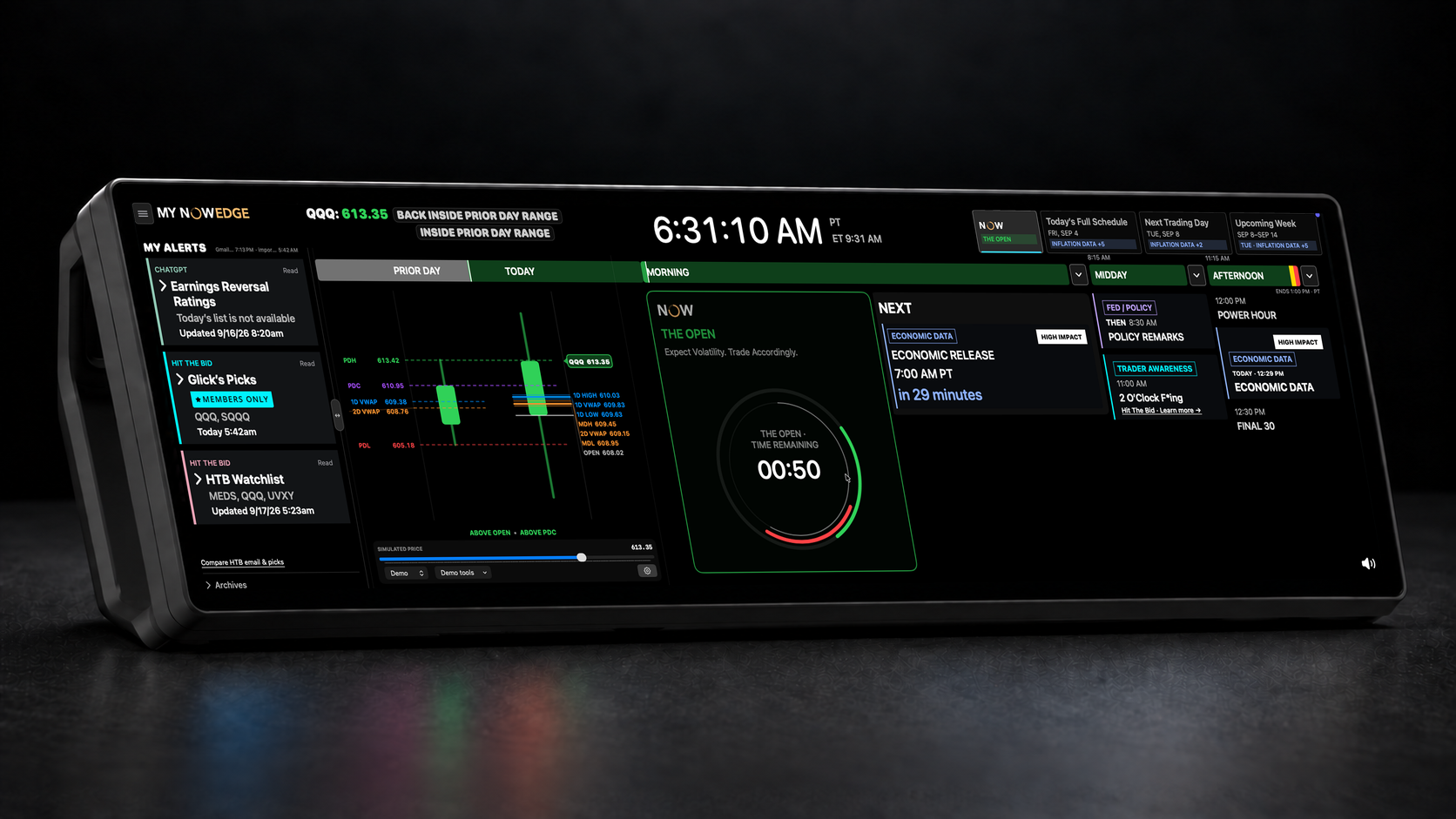
Always in view. Never in the way.
NOWEDGE runs on an off-the-shelf 14.5-inch ultrawide LCD touchscreen positioned beneath my main monitors. The screen is hardware I bought. NOWEDGE is the heads-up display I’m building for it.
It brings the timing and context I care about into one persistent view: market sessions, scheduled events, earnings, AI and email alerts from the trading services I follow, and countdown timers to the next important moment.
Instead of opening another window or searching through tabs, I can glance down and understand what matters now and what’s coming next. It’s already helping me miss fewer moments, spend less time hunting for information, and keep more of my attention on the trade in front of me.
Right now, NOWEDGE is a personal macOS app built for my own trading desk. My hope is to eventually make it cross-platform, so other traders can place the same heads-up view wherever it works best in their setup.
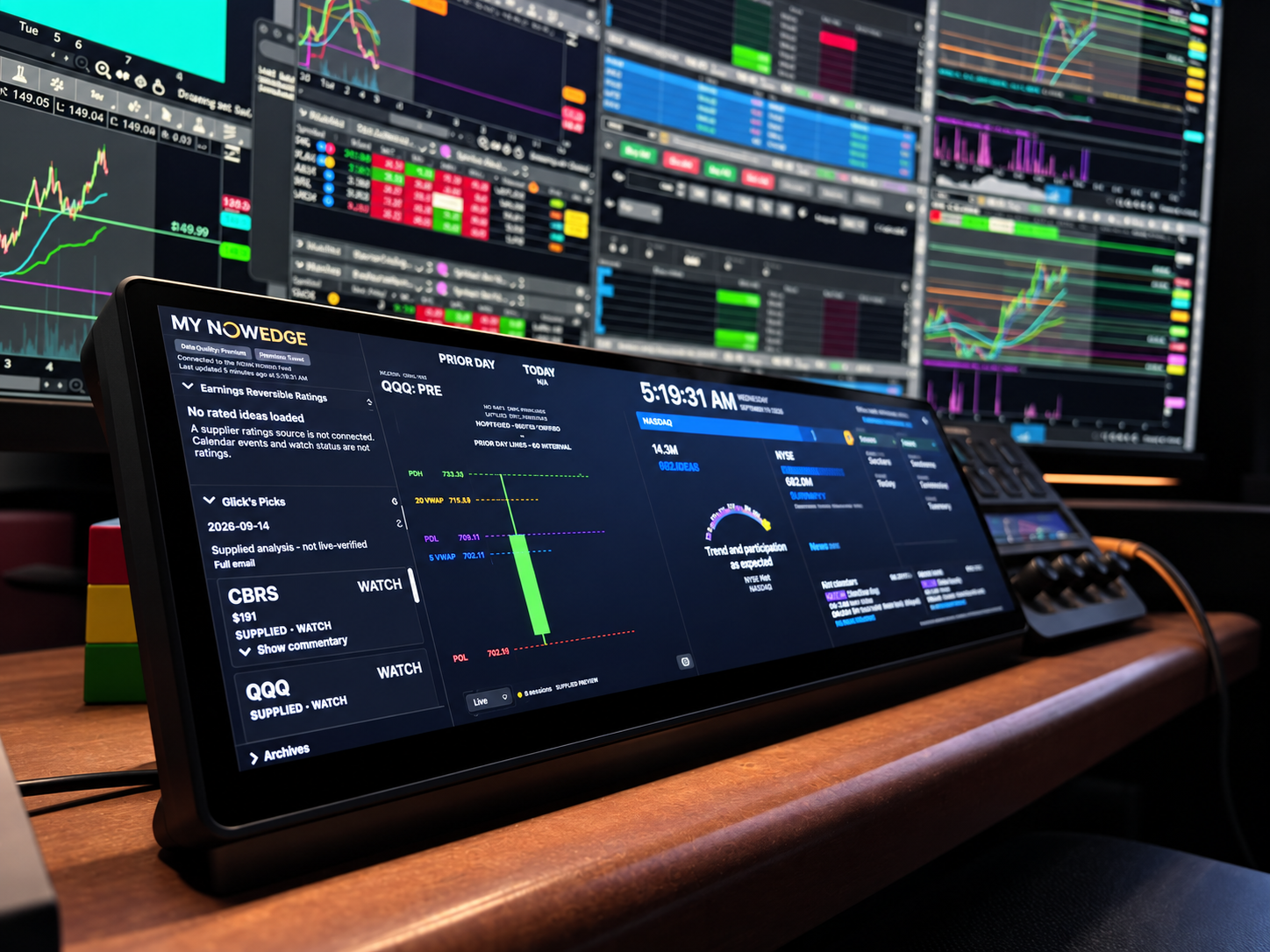
NOWEDGE brings supplied research, QQQ price references, the market clock, and scheduled events into one persistent view. Less searching when your attention is already on a trade.
Original captureI wanted a small, persistent place for the information that kept getting buried: where we are in the trading day, what’s coming next, and what deserves a closer look.
The product demo created for X, now shown here in motion. Displayed prices, research and calendar events are sample data.
Knowing something happens at 10:00 isn’t much help if you look up at 10:03. I wanted the market clock to stay in view while I focused on a trade—and to get a little harder to ignore when an important moment approached.
Original capture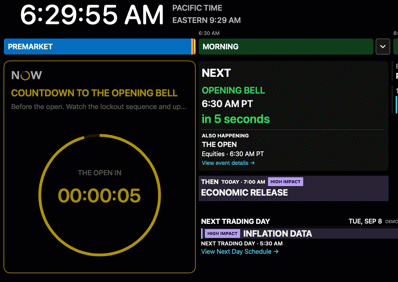
Your clock moves with the moment: the final five seconds, the opening bell, then THE OPEN. This 15-second recording loops. Calendar items shown belong to the recorded review scenario, not today’s live schedule. Show still frame stops the animation; reduced motion starts with the still.
The U.S. stock market day has a rhythm. Keeping the current session and next transition visible helps me stay oriented while my attention is elsewhere.
I want a reminder I can notice without constantly checking another window. This recording shows the native countdown reaching the bell, then becoming the opening-session timer.
I don’t always need another chart. Sometimes I need a quick answer: where is QQQ trading relative to yesterday’s range and the VWAP levels I’m watching?
Keeping those references in view helps me notice a level worth investigating without starting another round of window hunting.
Try it below: move the simulated price, change the VWAP conditions, and watch the Candle respond. Open Behind the scenes to explore more scenarios.
Email alerts and AI analysis, right at the edge of my view. I’m importing research on earnings reversals and other setups into EDGE, so the morning starts with the information in front of me.
Original captureLess digging through emails. Fewer tabs to track down. More time to study the setup and enjoy my coffee.
The starting point is earnings reversals taught by Kenny Glick at Hit The Bid. His emailed picks and my imported AI reviews sit side by side, with the source and commentary close at hand. I still evaluate the trade; EDGE keeps the preparation within reach.
The September 18 review shows ChatGPT Earnings Review, Glick’s Picks, and the experimental HTB Watchlist together. Each category keeps its update state, source details, and readable research cards close at hand.
WATCH, reject, and pass states organize what deserves further evaluation. They are research outputs—not trade-performance results, live setup qualification, or recommendations.
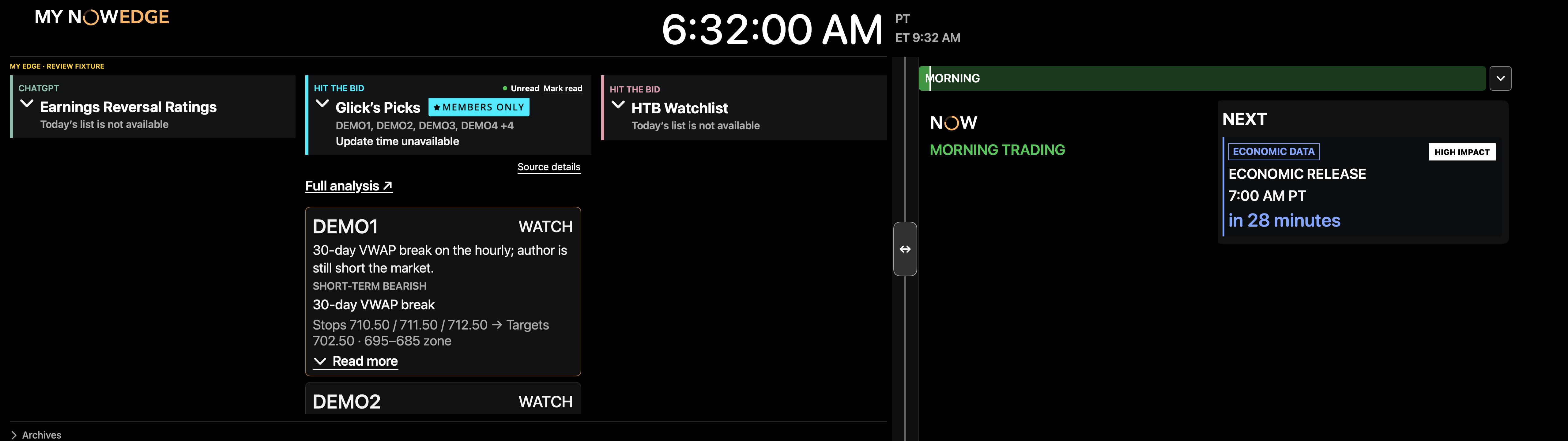
Native review captures from the accepted September 18 Friday UI lock. Research, prices, dates and events are synthetic examples, not live feeds or actual recommendations. Captured controls are not interactive.
The Fed decision, the press conference, economic data, and earnings share the same view as the trading day. You can keep the next event in sight without leaving your chart to go looking.
Original capture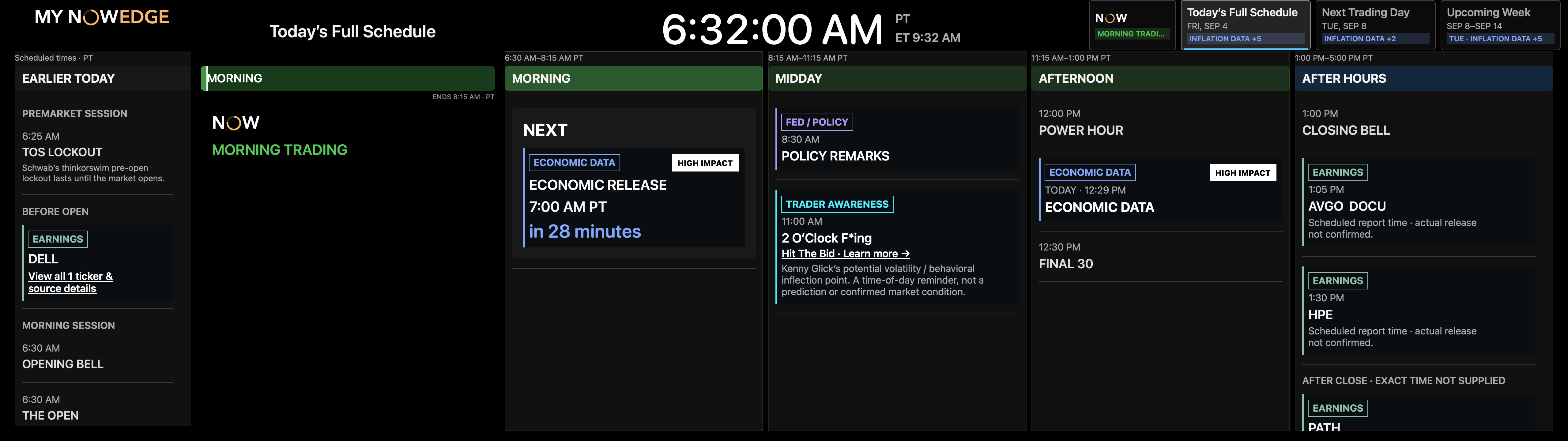
Select Enlarge to inspect the small labels. Controls inside this screenshot are part of the capture.
Native review from the accepted September 18 Friday UI lock. Dates, events and countdowns are synthetic review scenarios—not a live market schedule.
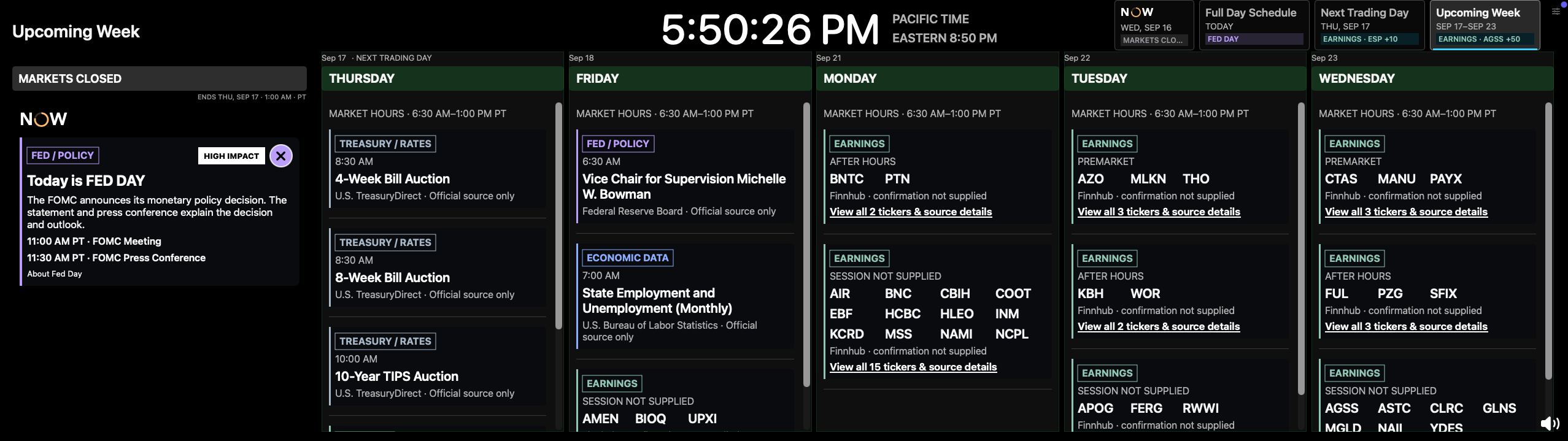
Select Enlarge to inspect the small labels. Controls inside this screenshot are part of the capture.
User-supplied app capture at 5:50 PM, retained as a dated view; not a live calendar.
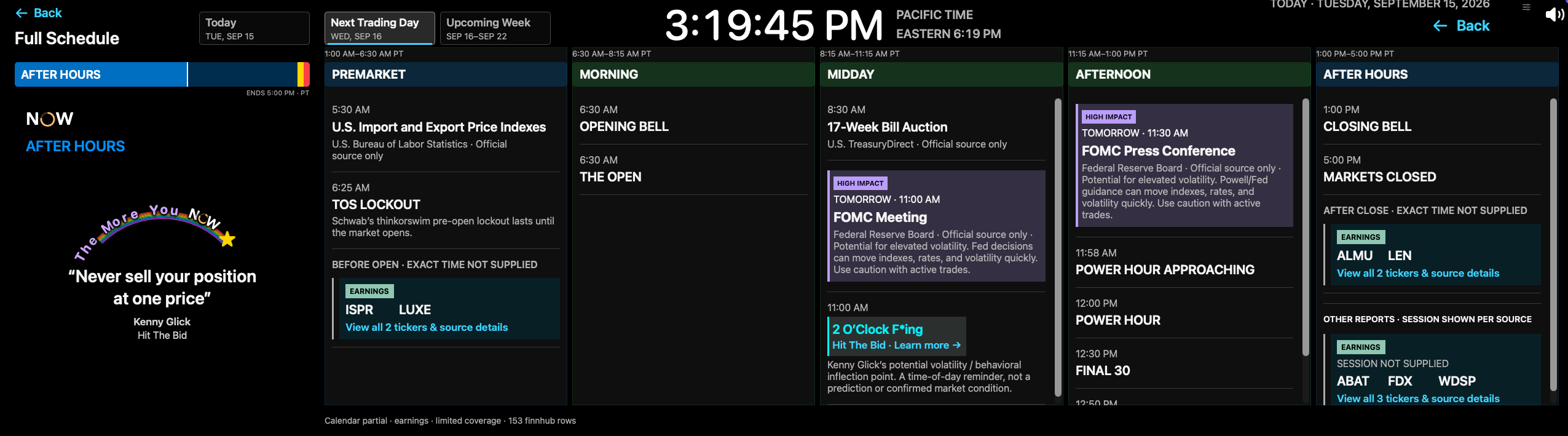
Select Enlarge to inspect the small labels. Controls inside this screenshot are part of the capture.
The September 15 capture highlights Wednesday’s FOMC meeting at 11:00 AM PT and press conference at 11:30 AM PT, in separate session columns. The source and high-impact context stay beside each event.
ISPR and LUXE appear before the open; ALMU and LEN appear after the close. Reports without a supplied session remain explicitly unconfirmed. These are dated calendar listings, not reversal ratings.
After Hours gives expected reports room to breathe. Source-review reasons and unknown timing remain visible, instead of assigning a precise time the provider never supplied.
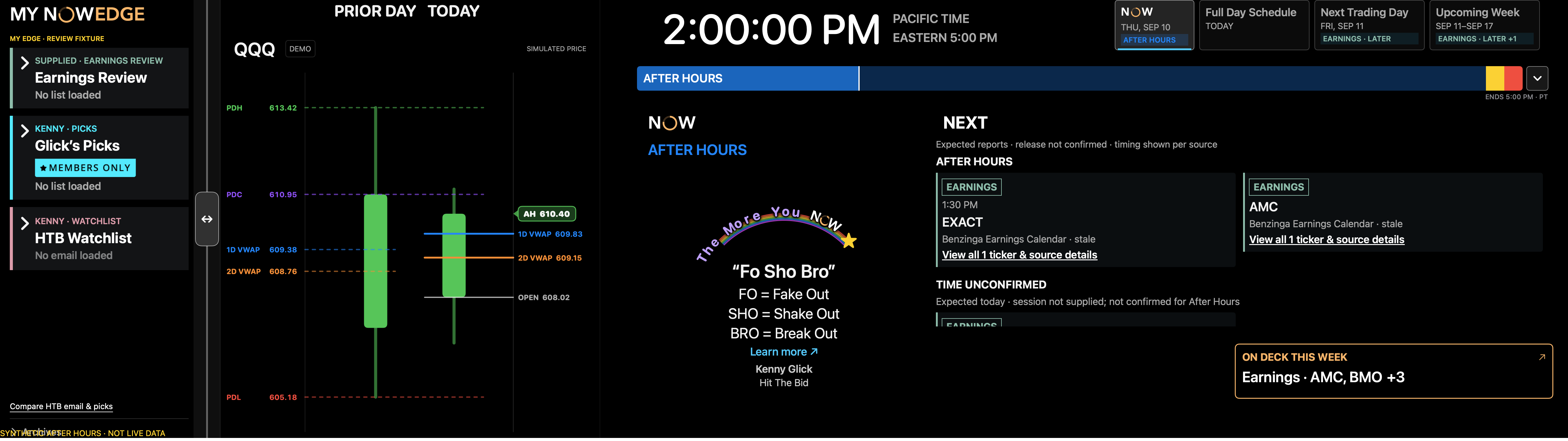
Native synthetic review, captured September 16. Sample dates, tickers and source-health warnings demonstrate the layout; they do not describe current earnings or provider health.
Earnings, Fed announcements and economic releases are the events I want to prepare for before I’m busy managing a trade. Keeping them beside the clock gives me one less thing to remember.
Earnings grouped by their supplied session, with ticker previews and source details. If the time is unknown, the display says so.
Keep rate decisions, statements, press conferences, and other scheduled Fed moments in view.
Economic releases and Treasury auctions share the schedule with the trading session. Read the event, time, and source in one glance instead of opening another calendar.
These are experiments I’m building and testing in my own workflow. Daily use will tell me which ones earn a permanent place on the desk.
I’m exploring AI-assisted earnings-reversal review, using my setup criteria and VWAP references to organize the names that need a closer look.
Keep FOMC decisions, Fed speakers, CPI, jobs data, Treasury auctions, and other scheduled events in view—with countdown alerts before they arrive.
That setup looked great right up until someone remembered Powell was speaking.
See the reports traders are watching, positioned within the session where they matter: Before Market Open, during the session, After Market Close, or at an exact scheduled time.
Part build journal, part design notebook, part record of things that seemed like a good idea at the time. These notes follow the project as I build it, trade with it, and learn.
A compact view of today’s price beside yesterday’s range. We’re building the Candle to make market context easier to read at a glance—and this interactive playground lets you move the price, change VWAP conditions, and watch the display respond.
Trading software is very good at showing everything. NowEdge is designed to keep only what deserves attention now in persistent view: the market's relationship to known levels, the current session, the next transition, and the day's catalyst sequence.
The market day is not one continuous block. Premarket, the open, lockouts, closes, and after hours each change what matters.
Freshness is part of the interface. Connecting, waiting, live, and stale are explicit states—never a misleading green light.
Quiet by default. The display becomes more insistent only when a real milestone approaches and action may be required.
I’m building NOWEDGE to help myself trade more effectively—and to learn what I can make with Codex along the way.
I bring the trading habits, the problems, and the daily testing. Codex helps turn those ideas into working software. Then I use it, find the awkward parts, and try again.
I don’t know whether this becomes a product anyone else wants. It has already improved how I trade, which is a useful place to start.